Following People by Name or Username
- Open Contacts from the top dashboard if you are using a computer

- If you are using a mobile device, click on the three dots in the top panel, click on Contacts. Then click on the two arrows on the top panel


- Type in a person’s name or username in Add new contact, then click on Connect
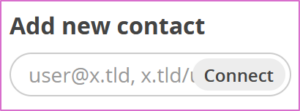
Note: You can only follow people that are in your node or in the Fediverse as approved by your node’s or server’s administrator.
Connecting Across the Fediverse
What is the Fediverse? The Fediverse is a network of independent social platforms that can all talk to each other. Think of it like email — you can have a Gmail address and still send emails to someone with a Yahoo address. The Fediverse works the same way for social media.
What does this mean for you? As a UDP-Social-Friendica member you can:
- Follow and interact with people on Mastodon
- Follow photo accounts on Pixelfed
- Subscribe to video channels on PeerTube
- Connect with communities on Lemmy and Diaspora
All without ever leaving your UDP-Social-Friendica account.
How to Follow Someone on Another Platform
- This first requires the admin of your node to follow the account(s)
- Then follow the same steps as outlined above
You are now connected and ready to engage. In the next section, we will show you how to post and share on UDP-Social.