Sharing your voice on UDP-Social-Friendica
Here is how to write your very first post:
- Locate the Post Box on the top right in a computer and on the bottom menu in mobile
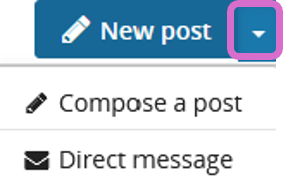

- Select Compose a post
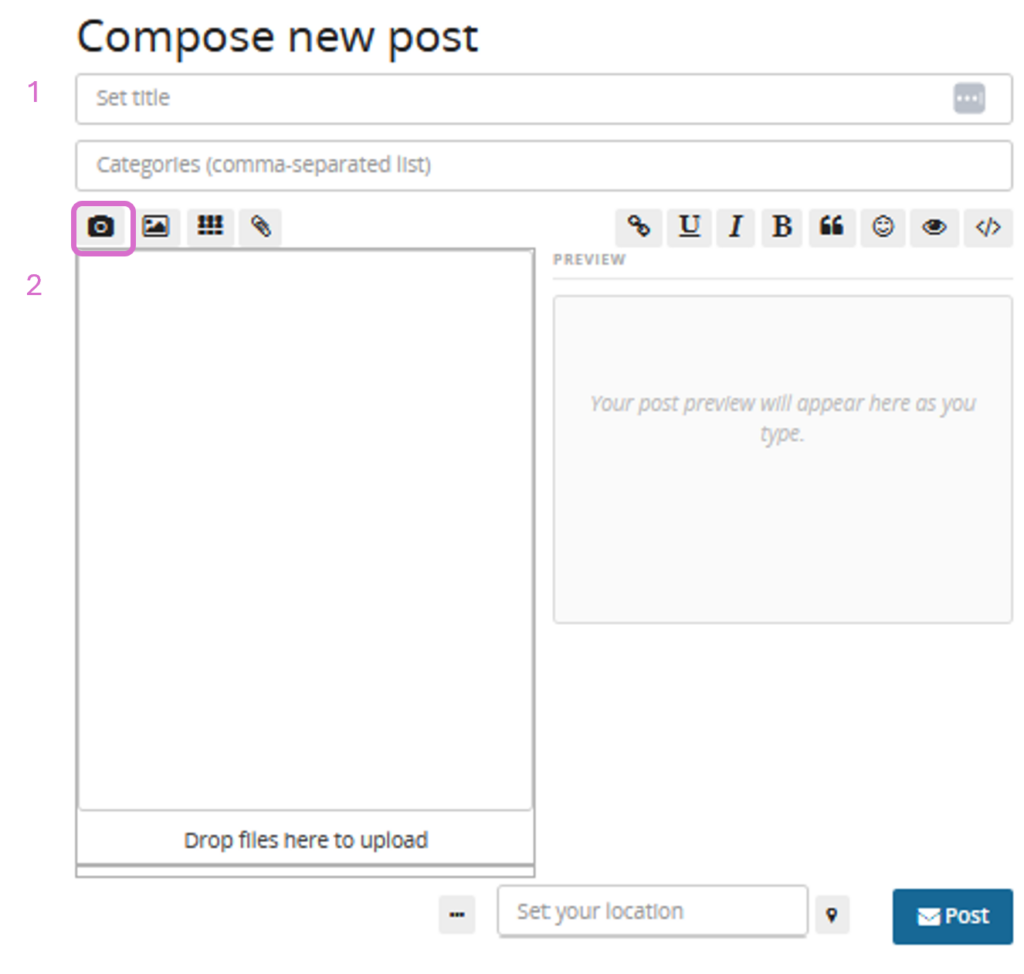
- Type the title of your post in the first box labeled 1 on the following figure
- Click inside the box labeled 2 to start writing whatever you would like to share — a thought, description, a question, a story, a link, or simply a hello
- Click on the camera icon to select camera, video or a file
- A preview will appear. In mobile, scroll down to see the preview
- Choose who can see it
- Under Visibility, before posting, select your audience:
- Your neighborhood
- Limited/Private
- Click Post
- Your post is now live!
Sharing Multiple Photos
- You can add multiple photos to a single post, by pressing and holding when selecting the photo
- They will display as a gallery in your feed
Using Hashtags
Hashtags are powerful tools for discovery and connection on UDP-Social-Friendica.
What is a Hashtag? A hashtag is a word or phrase preceded by the # symbol. It tags your post so that anyone searching or following that topic can find it.
How to Use Hashtags
- Simply type # followed by a word in your post
- Example: “Enjoying a beautiful morning in DC. #WashingtonDC #GoodMorning #Wellness”
- Click Post and your post is now discoverable by anyone following those hashtags
Hashtag Tips
- Use hashtags that are relevant to your post
- A few well chosen hashtags work better than a long list
- Hashtags are especially useful for reaching people beyond your existing followers
- Follow hashtags that interest you to see related posts in your feed
Mentioning Someone in a Post
Want to include someone in your post or give them a shoutout?
- Type @ followed by their username in your post
- Example: “Just had a great conversation with @kali — so grateful for this community!”
- They will receive a notification that they were mentioned
Mentioning Someone on Another Fediverse Platform
- Use their full Fediverse address
- Example: “Loving this photo by @daniel@pixelfed.social!”
- They will receive the mention even though they are on a different platform
Liking, Commenting, and Sharing
Engaging with other people’s posts is just as important as posting your own:
Liking a Post
- Click the like icon below a post
- The person who posted will receive a notification
- A simple but meaningful way to show appreciation
Commenting on a Post
- Click Comment below a post
- Type your response and click Post
- Comments create conversations — do not be shy!
Sharing Someone’s Post
- Click the Share or Reshare icon
- The post will be shared to your own feed with credit to the original author
- You can add your own thoughts above the reshare
Editing and Deleting Posts
Made a typo? Changed your mind? No problem:
Editing a Post
- Click the three dots (…) or menu icon on your post
- Select Edit
- Make your changes and click Save
- Edited posts will show a small note that they have been edited
Deleting a Post
- Click the three dots (…) on your post
- Select Delete globally
- Confirm the deletion
- The post will be permanently removed
You are now ready to post, share, and engage with your community.